

Sending an important email only to have it vanish into the recipient's spam folder is one of the most frustrating and costly challenges in modern communications. Major mailbox providers like Google, Yahoo, Microsoft, and Apple enforce strict authentication thresholds: if your domain does not rigorously prove its identity, your messages will be demoted to spam or rejected outright at the SMTP boundary.
The common belief that "adding an SPF record is enough" is a dangerous misconception. In contemporary email infrastructure, deliverability relies on an indivisible trinity: SPF, DKIM, and DMARC. None of them is sufficient on its own; each addresses the inherent vulnerabilities of the other two.
In this guide, we dive deep into the RFC standards governing each mechanism, examine frequent architectural pitfalls (such as the 10-DNS-lookup limit in SPF), and demonstrate how to configure and monitor your email security visually using Dymmer.
The Authentication Trinity: Why You Need All Three
To understand why three independent protocols are indispensable, consider what each verifies during a standard SMTP transaction:
-
SPF (Sender Policy Framework): Authorizes the sending server's IP address against a list published in DNS. It protects the envelope sender identity (
Return-PathorMAIL FROM). - DKIM (DomainKeys Identified Mail): Provides cryptographic integrity for message headers and body. It ensures the message was not modified in transit and was signed by an authorized private key matching a public key in your DNS.
-
DMARC (Domain-based Message Authentication, Reporting, and Conformance): Acts as the policy and alignment umbrella. It ties the human-readable
From:header to the identities verified by SPF and DKIM, instructing receivers on how to treat failures (ignore, quarantine, or reject).
sequenceDiagram
    autonumber
    actor Sender as Sending MTA
    participant DNS as Sender DNS
    actor Receiver as Receiving MTA
    actor Inbox as User Inbox

    Sender->>Receiver: SMTP Connection + TLS
    Note over Sender,Receiver: HELO mail.novasolutions.tech<br/>MAIL FROM info@novasolutions.tech
    Receiver->>DNS: Query SPF TXT (novasolutions.tech)
    DNS-->>Receiver: v=spf1 ip4:198.51.100.42 ... -all
    Note over Receiver: IP authorized: SPF Pass
    Sender->>Receiver: Headers and Body with DKIM-Signature
    Receiver->>DNS: Query DKIM TXT (mail._domainkey)
    DNS-->>Receiver: RSA / Ed25519 Public Key
    Note over Receiver: Cryptographic signature valid: DKIM Pass
    Receiver->>DNS: Query DMARC TXT (_dmarc)
    DNS-->>Receiver: v=DMARC1 p=reject rua=mailto:...
    Note over Receiver: Alignment From with SPF and DKIM: DMARC Pass
    Receiver->>Inbox: Direct Delivery to Inbox
If any link in this chain breaks, deliverability collapses:
-
SPF alone: Forwarded emails inevitably fail SPF because the forwarding server's IP is not in your DNS record. Additionally, SPF does not validate the visible
From:address, leaving your brand open to direct spoofing. - DKIM alone: Proves that the message was signed without tampering, but provides no instruction to receivers on what to do when an unsigned email impersonates your domain.
-
Without DMARC: Neither SPF nor DKIM enforces alignment with the visible
From:address seen by the recipient, allowing malicious actors to exploit your reputation for phishing.
1. SPF: Authorizing Sending Servers Without Exceeding the 10-Lookup Limit
Defined in the RFC 7208 standard, SPF allows domain owners to publish a list of authorized servers in a DNS TXT record.
A standard SPF record at the zone apex (@) looks like this:
v=spf1 mx ip4:198.51.100.42 include:_spf.dymmer.com -allKey components explained:
-
v=spf1: Mandatory version tag that must appear at the beginning of the record. -
mx: Authorizes all servers published in the domain's MX records. -
ip4:198.51.100.42(or CIDR blocks likeip4:198.51.100.0/24): Authorizes explicit IP ranges directly without requiring any DNS queries. -
include:_spf.dymmer.com: Incorporates the SPF policy of an external provider (such as Dymmer's outbound mail cluster). -
-all(Hard Fail): Instructs receiving servers to reject any sender not matching the preceding mechanisms. Avoid leaving~all(SoftFail) or?all(Neutral) in place once your setup is verified.
The 10-DNS-Lookup Limit (RFC 7208 §4.6.4)
The most common operational failure in SPF configuration is exceeding the 10-DNS-lookup limit. To protect receiving servers against amplification and denial-of-service (DoS) attacks, RFC 7208 limits the number of mechanisms that require DNS queries (include, mx, a, ptr, redirect, exists) to a maximum of 10 per verification.
When organizations integrate multiple third-party tools (such as Google Workspace, Mailchimp, Zendesk, and Salesforce), each nested include adds additional queries. On query number 11, receiving servers abort evaluation and declare a permanent error: SPF PermError.
[!WARNING] An
SPF PermErroris treated by major mailbox providers as a total authentication failure, routing your messages directly to the spam folder or dropping them completely.
Best practices to stay well within limits:
-
Use direct
ip4:orip6:declarations for static infrastructure. -
Eliminate deprecated mechanisms like
ptr(prohibited by RFC 7208) or redundantamechanisms whenmxor explicit IPs already cover your hosts. -
Never publish multiple SPF records in the same domain. The RFC mandates that if a receiver encounters two
v=spf1records, it must discard both.
2. DKIM: Cryptographic Message Integrity
Specified in the RFC 6376 standard, DKIM ensures that emails cannot be altered during transit and remains valid even after message forwarding. The sending server generates a digital signature (typically 2048-bit RSA or Ed25519) across crucial headers (From, To, Subject, Date, Message-ID) and a hash of the message body.
The signature is attached in the DKIM-Signature header:
DKIM-Signature: v=1; a=rsa-sha256; c=relaxed/relaxed; d=novasolutions.tech;
  s=mail; t=1730894400;
  h=from:to:subject:date:message-id;
  bh=47DEQpj8HBSa+/TImW+5JCeuQeRkm5NMpJWZG3hSuFU=;
  b=dB7G...x89Q==
Receivers verify this signature by fetching your public key from DNS using the selector (s=) and domain (d=):
Host: mail._domainkey.novasolutions.tech
Type: TXT
Value: v=DKIM1; k=rsa; p=MIIBIjANBgkqhkiG9w0BAQEFAAOCAQ8AMIIBCgKCAQEA0Y3yZ24D8...
Essential Guidelines for DKIM
- Key length: Always use 2048-bit keys. Legacy 1024-bit keys are considered cryptographically weak and are penalized by modern spam filters.
-
Canonicalization (
c=relaxed/relaxed): Allows for whitespace and formatting adjustments made by intermediary mail servers without invalidating the cryptographic hash. -
Dedicated selectors: Assign unique selectors for separate sending streams (e.g.,
mail._domainkeyfor user mailboxes andapp._domainkeyfor automated notifications).
3. DMARC: Policy Enforcement and Domain Alignment
Defined in the RFC 7489 standard, DMARC serves as the cornerstone of email authentication. It performs three critical functions:
-
Identifier Alignment: Requires the domain shown in the visible
From:header to match the domain validated by SPF (Return-Path) or DKIM (d=novasolutions.tech). You can specify relaxed alignment (aspf=r, organizational domain match) or strict alignment (aspf=s, exact subdomain match). -
Policy Enforcement (
p=): Instructs the receiving MTA how to handle messages that fail both SPF and DKIM alignment:-
p=none: Monitoring mode. Collects reports without affecting message delivery. -
p=quarantine: Delivers failing messages to the spam/junk folder. -
p=reject: Refuses failing messages at the SMTP connection with a5xxerror code.
-
-
Aggregate Reporting (
rua=): Directs mailbox providers to send daily XML feedback reports detailing who is sending email on behalf of your domain and whether each message passed or failed authentication checks.
A complete DMARC record published at the _dmarc subdomain:
Host: _dmarc.novasolutions.tech
Type: TXT
Value: v=DMARC1; p=reject; rua=mailto:dmarc-reports@novasolutions.tech; aspf=s; adkim=s
Practical Implementation in Dymmer
Manual DNS configuration in traditional control panels often results in formatting errors, escaped quotes, or truncated base64 DKIM keys.
Dymmer provides a unified, structured DNS management environment that guarantees technical precision.
The DNS Zone Management View
In Dymmer's DNS management interface for our sample domain (novasolutions.tech), all four essential records are organized with clear type, host, and value mappings:
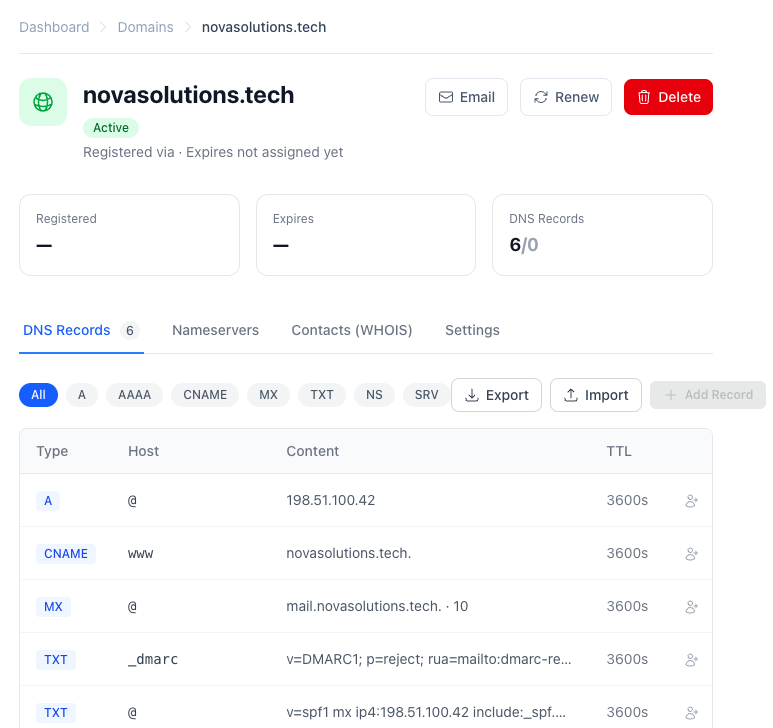
The interface highlights the required configurations:
-
MX: Configured with priority
10pointing tomail.novasolutions.tech.for inbound routing. -
TXT at
@(SPF): Declaring authorized sending servers with the-allhard fail qualifier. -
TXT at
mail._domainkey(DKIM): Storing the RSA public key without truncation or character encoding corruption. -
TXT at
_dmarc(DMARC): Enforcingp=rejectpolicy and specifying the aggregate report destination.
Real-Time Mail Security Diagnostics
What sets Dymmer apart is its built-in Mail Security engine. Rather than requiring external command-line tools (dig, delv) or third-party check services, Dymmer continuously evaluates your zone against RFC specifications:
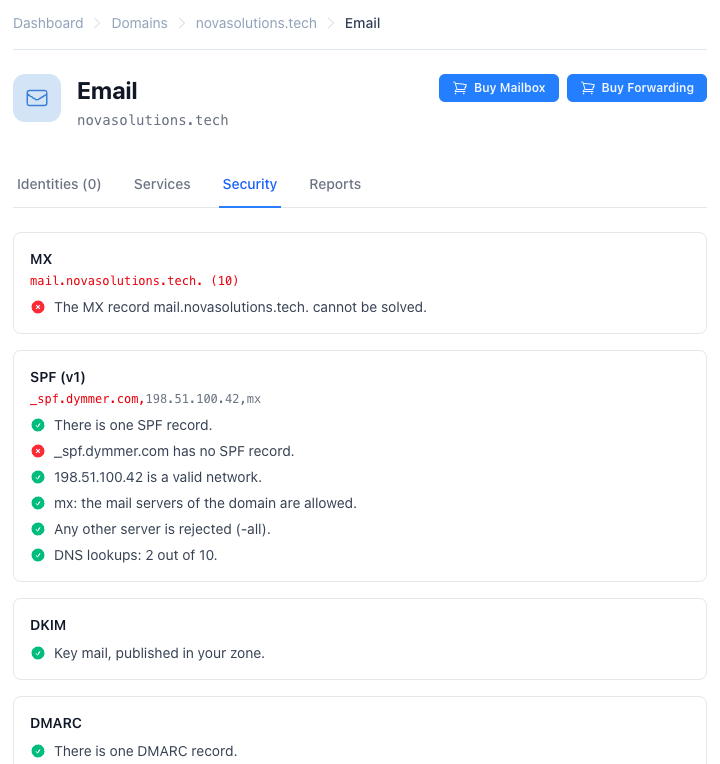
Key diagnostic capabilities shown above:
- MX Resolution: Confirms that designated mail servers resolve to valid IP addresses.
-
SPF Verification:
- Confirms a single valid SPF record exists.
-
Verifies presence of the mandatory
-allenforcement rule. -
Validates network blocks and IP addresses (
198.51.100.42). -
DNS Lookup Counter: Calculates lookup costs (e.g.,
2 out of 10 lookups used), providing proactive warnings before you approach the 10-query ceiling.
- DKIM Validation: Verifies that your selector keys are correctly published and syntactically sound.
-
DMARC Inspection: Confirms that your domain is actively protected under an enforcement policy (
reject) and validates that your report recipient address (rua=) is operational.
Recommended 3-Stage Rollout (Zero Downtime)
When configuring authentication for an active production domain, never enforce p=reject on day one. Adopt a phased rollout:
flowchart LR
    A["Phase 1: Audit<br/>p=none"] --> B["Phase 2: Quarantine<br/>p=quarantine + pct=20..100"]
B --> C["Phase 3: Full Protection<br/>p=reject + aspf=s"]-
Phase 1: Passive Monitoring (
p=none)
Deploy SPF and DKIM. Set DMARC top=none; rua=mailto:dmarc-reports@yourdomain.com. Review aggregate reports over 2 to 4 weeks to identify legitimate outgoing services that may need SPF authorization or dedicated DKIM keys. -
Phase 2: Gradual Quarantine (
p=quarantine)
Once all legitimate sources align, update your policy top=quarantine; pct=20. Gradually scalepctto50and100. Unauthorized messages will now be diverted to the spam folder. -
Phase 3: Strict Rejection (
p=reject)
Lock down your domain:v=DMARC1; p=reject; aspf=s; adkim=s. Any spoofed email impersonating your organization will be blocked at the SMTP gate.
Conclusion
Securing inbox placement is no longer about subject-line tricks or keyword optimization. It is fundamentally an engineering discipline built upon cryptographic trust and network standards.
By implementing SPF (RFC 7208), DKIM (RFC 6376), and DMARC (RFC 7489) together, you guarantee:
- Zero tolerance for spoofing and brand impersonation.
- Peak sender reputation across Gmail, Yahoo, and Microsoft 365 algorithms.
- Full transparency into your outbound email ecosystem through automated DMARC telemetry.
With Dymmer's automated DNS and mail security inspection tools, implementing and maintaining this infrastructure is seamless, reliable, and continuously verified.